Safe to fail
Collisions, wrong offsets and forgotten spindles happen in the twin, where they cost nothing and can be replayed and discussed.
In most labs, one machine serves thirty students and every mistake costs a tool or worse. With Studio, every student has the machine on their own PC — the same controller, the same alarms, the same programs as the MC-1 in the workshop.
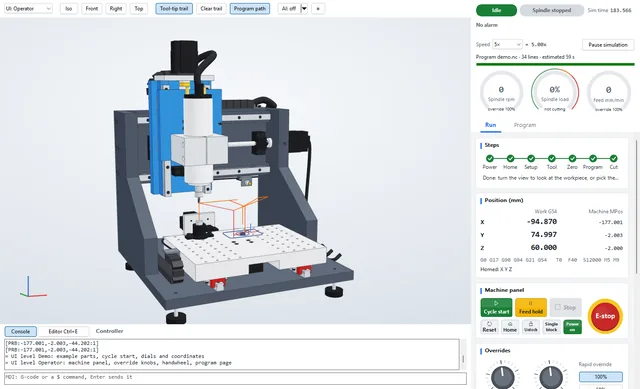
Collisions, wrong offsets and forgotten spindles happen in the twin, where they cost nothing and can be replayed and discussed.
Studio is free and runs on ordinary Windows PCs. The whole class practises at once; the real mill is for the parts that passed.
Sessions can be recorded and replayed, and the audit log records who did what with a hash chain that shows tampering. Check reports, collisions and part deviation turn a practical exam into data.
Inject a broken limit wire, a drive alarm or a lost VFD link and let students diagnose it, as maintenance technicians must.
Ten modules, being written with our pilot schools for 2026–27. Each will have a lesson, a Studio exercise with an automatic check, and a practical on the real machine.
| 1 | The machine and safety | Axes, E-stop, the power-on sequence, homing |
| 2 | Coordinates and zero | Machine and work coordinates, G54, tool length |
| 3 | G-code fundamentals | G0/G1/G2/G3, feeds, modal states, check mode |
| 4 | Tools and cutting data | Speeds, feeds, chip thickness, chatter |
| 5 | Workholding | Vise, clamps, tape; forces and slipping |
| 6 | Toolpaths and CAM | Pockets, contours, adaptive and trochoidal paths |
| 7 | Alarms and recovery | Limits, drive faults, lost communication, restart |
| 8 | Measurement and accuracy | ISO 230 tests, backlash, part inspection |
| 9 | Automation | Scripting the twin, MTConnect, data |
| 10 | Capstone | Design → verify in the twin → make on the MC-1 |
Studio on every classroom PC with the example library; the teacher pack (slides, exercises, answer files) follows with the curriculum.
MC-1 machines for the workshop with training and a curriculum licence.
Online course and certificate for students and self-learners.
No. It is one program that runs offline. Install it on as many PCs as you like.
Studio has English and Simplified Chinese built in and switches between them while running; other languages can be added as language packs. The curriculum is being written in English and Chinese.
Yes, on Windows 10 or 11. Integrated graphics are enough; Studio falls back to software rendering if needed.
If you want them to. The assistant can run on a local model (LM Studio or Ollama), so nothing leaves the classroom, and the audit log shows what the AI did. The twelve static rules give every student feedback on each line as they type, with or without AI.
Yes. We can provide the documents usually required for education procurement; tell us what your process needs.