Times in the margin
After a run every line shows the seconds it took. The lines add up to the run time exactly, and the removed volume to the total.
Studio's program editor is wired to the twin. Every line gets the time it took, every mistake gets a rule and a line number, and every change can run to the end before it reaches metal.
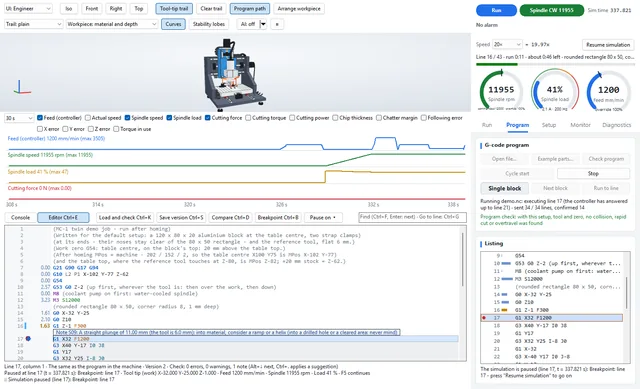
Built on Scintilla, the editing component of Notepad++ and SciTE, with G-code colouring and a margin that the twin fills in.
After a run every line shows the seconds it took. The lines add up to the run time exactly, and the removed volume to the total.
0.4 s after you stop typing, grblHAL's check mode and twelve static rules go through the program. Findings sit in the margin; Ctrl+. applies a suggested fix.
The status bar shows what the controller's modal state will be after the line under the cursor: units, plane, distance mode, work offset, feed, spindle, coolant, tool.
Stop at a line, or when force, spindle load, following error or chatter margin crosses a limit, at the first cut, a near miss, a rapid into material, a collision or an alarm. Virtual time freezes; the motion is not changed.
Studio writes the start block for any line: tool, offsets, spindle, coolant and a safe approach. Example 02 restarted at line 460 leaves the same workpiece as an uninterrupted run.
Every program you load or change is kept as a version with who and why; your own files are never overwritten. Ctrl+D compares two side by side, with their run times.
Check mode finds what grblHAL refuses. These rules find what it runs anyway — and what this build does not support at all.
S01 | Warning | No safe start block before the first move (units, distance mode, plane, work offset): the program relies on the controller's state. |
S02 | Warning | No M2/M30 at the end: the controller keeps its modes, the spindle and the coolant. |
S03 | Info | A tool change (M6) with the tool below Z0: retract first. |
S04 | Error | A cutting move before any F: grblHAL refuses it (error:22) or uses the feed left from before. |
S05 | Warning | The spindle started without S, or S outside the spindle's range. |
S06 | Info | F above the axes' top speed in the move's direction: the planner caps it. |
S07 | Error | A code this grblHAL build does not take: expressions, O-word flow control, subprograms, cutter compensation G41/G42, rotation G68. |
S08 | Info | Dense short lines: the planner's queue holds too little path to brake from F, so the feed stays lower. |
S09 | Info | A deep straight plunge: consider a ramp or a helix and a centre-cutting tool. |
S10 | Warning | A rapid below Z0, deeper than the program has cut so far: a rapid into material breaks tools. |
S11 | Error | An arc the controller refuses (error:33): radius and end point do not agree. |
S12 | Warning | The water-cooled spindle turns during feed moves without its coolant (M8). |
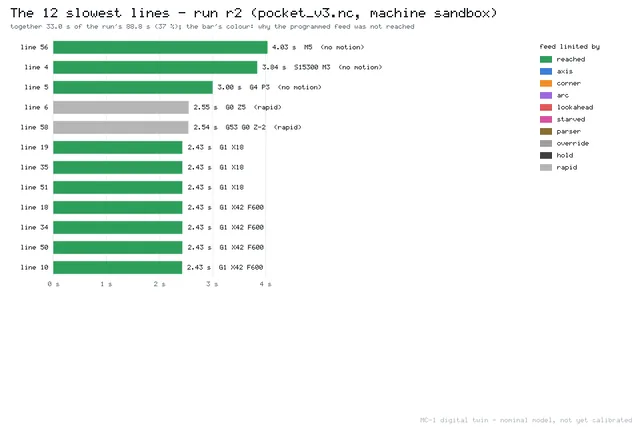
For every line Studio records whether the programmed feed was reached, and if not, what held it back — from grblHAL's own junction and braking arithmetic, not from a guess.
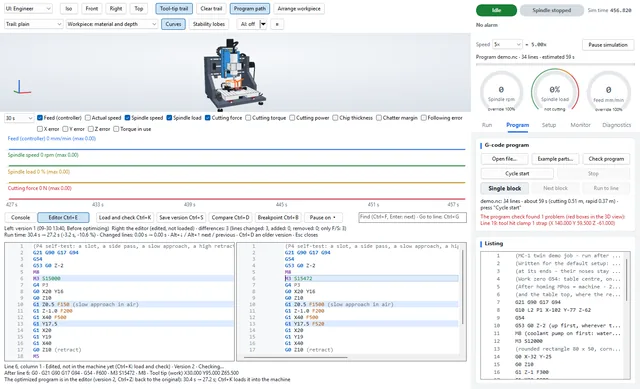
The optimizer changes numbers, not the path. Every candidate runs to the end on a fresh twin and is only accepted if nothing got worse.
| Example | Before | After | Change |
|---|---|---|---|
| ISO test piece | 18:37 | 17:38 | -5.3 % |
| Pocket with islands | 10:20 | 9:33 | -7.7 % |
| 3D relief | 17:43 | 16:47 | -5.2 % |
| Involute spur gear in brass | 21:06 | 19:46 | -6.3 % |
| Holes and thread milling | 15:42 | 15:22 | -2.2 % |
| Engraving and chamfer in POM | 2:28 | 2:28 | -0.2 % |
| Microfluidic mould in brass | 5:11 | 5:02 | -3.0 % |
| Trochoidal vs conventional slot | 5:58 | 5:45 | -3.5 % |
| T-slot and dovetail | 5:51 | 5:42 | -2.4 % |
| Heat sink with thin fins | 17:22 | 17:11 | -1.1 % |
| Geneva drive | 13:54 | 13:11 | -5.2 % |
| Mould cavity with draft | 12:58 | 11:55 | -8.1 % |
| Watch wheel, module 0.3 | 20:28 | 19:19 | -5.6 % |
| Honeycomb lightening plate | 18:09 | 17:57 | -1.1 % |
| Centrifugal impeller | 20:40 | 20:27 | -1.1 % |
| All fifteen | 3:26:26 | 3:18:02 | -4.1 % |
Machine time in the twin (Linux build, 2026-09-29). Every result was accepted; the peak cutting force rose only on example 05 (7.0 → 7.1 N), the chatter margin moved by at most 0.009, and all 14 parts with a design part still pass 100 %. The model's parameters are nominal until the machine is calibrated, so these are simulated savings.
Describe features instead of lines: the generator writes the program for the blank on the table, runs it on a background twin and, where the tool would chatter, writes it again at a stable spindle speed or with a shallower pass.
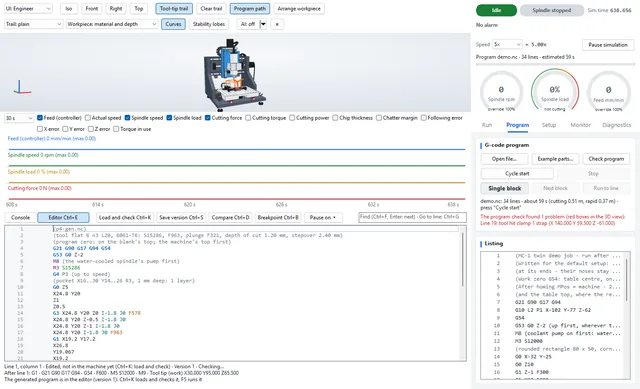
The editor is driven from the keyboard; F1–F12 always act on the machine.
| Ctrl+E | open or leave the editor |
| Ctrl+K | load into the machine and check |
| Ctrl+S | save a version |
| Ctrl+D | compare with the previous version (again: an older one) |
| Ctrl+B | breakpoint on the line; Ctrl+Shift+B: a conditional pause |
| Ctrl+. | apply the suggested fix |
| Alt+↓ / Alt+↑ | next / previous finding or difference |
| Ctrl+Shift+O | optimize (again: stop) |
| Ctrl+Shift+G | generate a program from features |
| F5 | cycle start, or continue after a pause |
No. The result arrives in the editor as an undoable edit, next to the version before it; both are kept as versions. Your own files are never overwritten.
Yes. Open any G-code file; the check and the rules tell you which lines this controller would refuse or run differently than intended.
No. It covers the simple features a manual machinist programs by hand. Free-form surfaces and multi-feature parts come from CAM.
They are what the twin computes with nominal machine and cutting parameters. They become measured numbers when the MC-1 prototypes are calibrated against the twin.
Load an example, change a line and watch the margin, the rules and the run time answer.